SKUs & the product catalogue
A SKU is the single source of truth for one product type in Loca.fi. Every physical item you track must trace back to a SKU, and the lifecycle state of that SKU governs what operations are available on every item beneath it.
What is a SKU?
A SKU (Stock Keeping Unit) is a product definition. It groups together everything that identifies and classifies a product type:
- Name and SKU number — the primary identifiers
- Item template — determines which extended properties attach to items of this SKU (see Templates & extended properties)
- Barcode and encoding — controls how RFID tag numbers are generated (see Encoding)
- Classification — Brand, Category, Department, Supplier, Style, Season, Size, Colour, and Gender
- Pricing — retail, sale, and member prices; optional SKU-level unit cost
SKUs live in the product catalogue — the SKU list page. Each row in the catalogue is one product definition. Items are the physical instances; SKUs are the definitions they belong to.
The SKU lifecycle
A SKU moves through five lifecycle states from creation to retirement. Understanding these states — and the transitions between them — is the most important thing to know about the product catalogue.
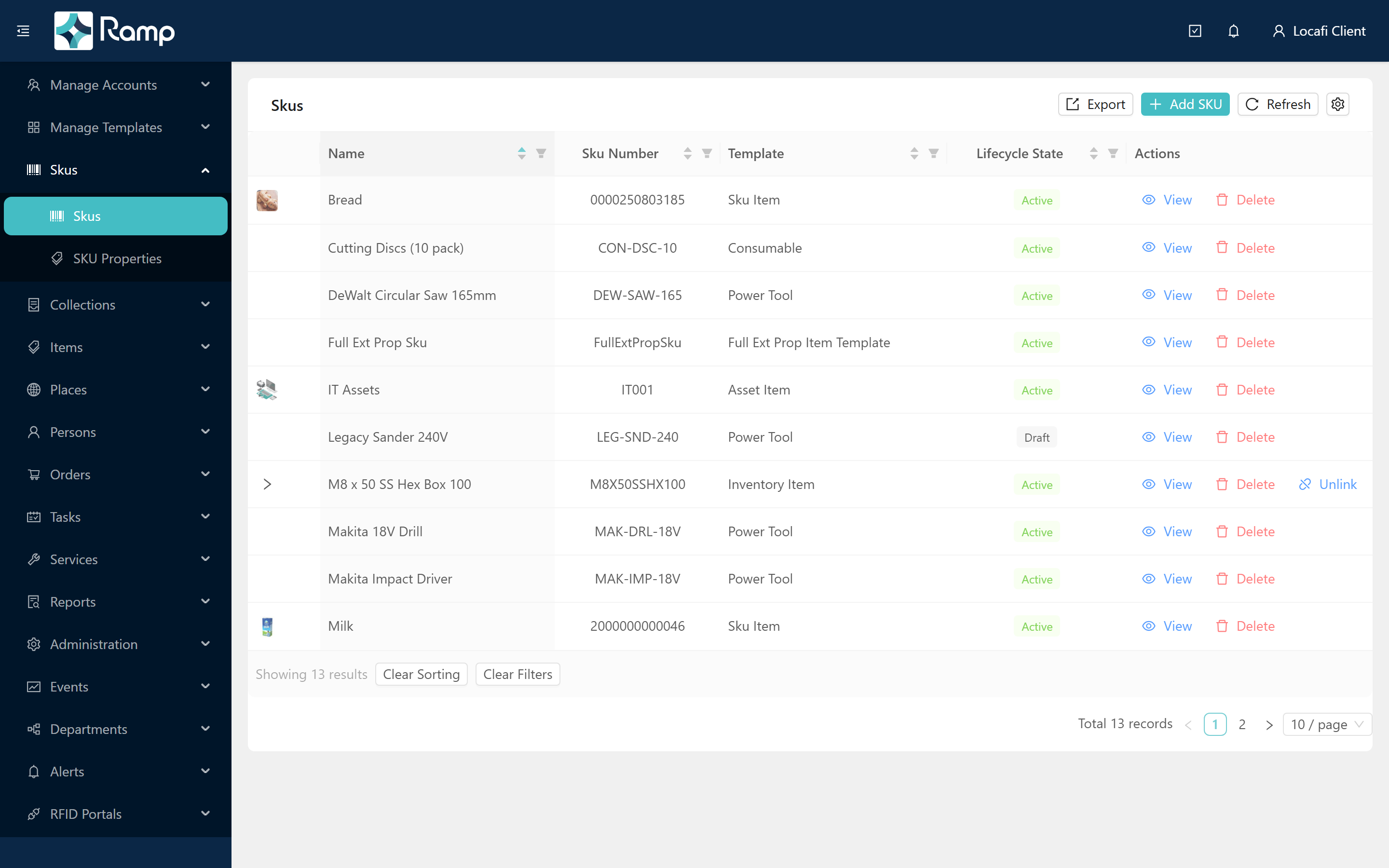
The five states and their visual indicators in the portal:
| State | Badge colour | Meaning |
|---|---|---|
| Active | Green | Operational — items can be created, tags generated, and order lines added |
| Draft | Grey | Not yet operational — new SKUs always start here |
| Clearance | Orange | Still operational, but the product is being phased down |
| EOL | Red | End of Life — still operational but no new stock expected |
| Discontinued | Red | Retired — no further operations; recoverable only via Re-launch |
The SKU list shows a coloured state badge on every row:
Re-launch
Discontinued SKUs can be returned to the catalogue via Re-launch, a confirm-guarded action on the SKU edit page. Re-launch returns the SKU to Draft state. The SKU must then be set to Active before it can be used again.
The OPERATIONAL rule
Draft and Discontinued SKUs cannot have items created, tags generated, or order lines added against them.
When a SKU is in Draft state, the edit page displays a warning:
"This SKU is in Draft state. It must be set to Active before items can be received or tags generated."
The Status card on the right of the edit page always shows the current lifecycle state:
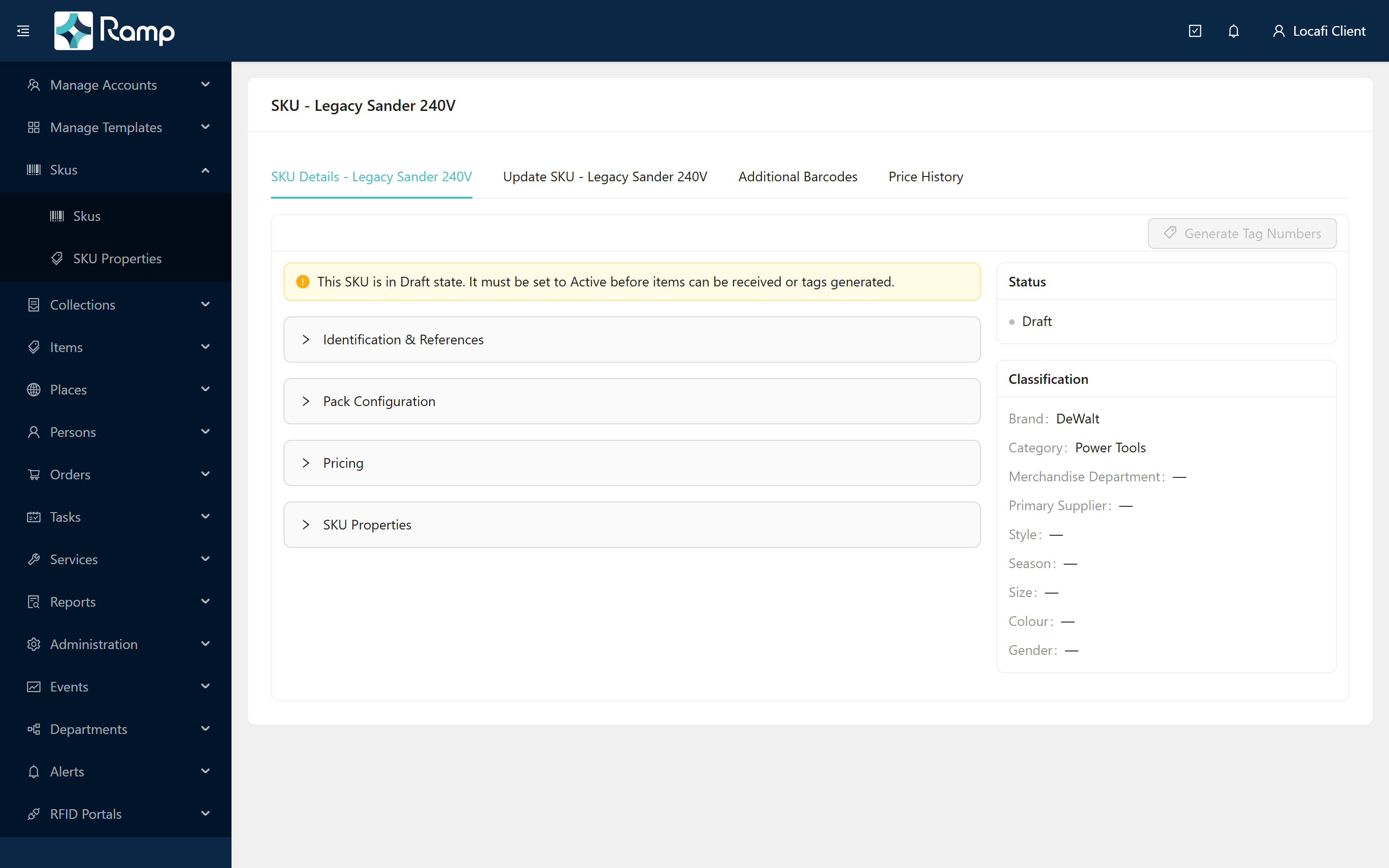
Change the Lifecycle State to Active using the selector on the Edit tab and save to make the SKU operational. Clearance and EOL SKUs remain fully operational — only Draft and Discontinued are blocked.
SKU types
The SKU Type field controls what kind of quantity a SKU represents:
- Standard — a fixed-quantity product
- Variable Percent — quantity varies as a percentage (for example, fabric sold by the metre)
- Variable Quantity — quantity varies as an absolute amount
Inner and outer packs
An outer SKU can link to exactly one inner SKU with an inner quantity — representing a pack of the inner product (for example, a carton of twelve units, where the inner SKU is the individual unit). The SKU list shows a chevron expander on rows that have a linked inner SKU; clicking it reveals the inner SKU details inline.
Unlinking an inner SKU is confirm-guarded and requires saving the outer SKU to take effect.
Inner SKUs may additionally use the Kanban type, which is used for inner/kanban replenishment SKUs.
Encoding
The Encoding Type field controls how RFID tag numbers are generated for a SKU's items:
| Encoding Type | Description |
|---|---|
| Sgtin | GS1 Serial GTIN — requires a Company Prefix, Item Reference, and optional Indicator |
| Grai | GS1 Returnable Asset Identifier — same field set as Sgtin |
| Custom Prefix | Prefix plus sequential counter — requires a Custom Prefix value |
| None | No automatic tag encoding — tags are assigned manually |
The fields shown on the SKU form change depending on the encoding type selected. For full encoding rules and tag number formats, see the Loca.fi API documentation.
Pricing
Prices are set at SKU level. Three price fields are available: Retail Price, Sale Price, and Member Price.
Unit cost can be stored at SKU level by enabling SKU Level Unit Cost — useful when all items of a product cost the same. When this option is off, unit cost is tracked per item instead.
Prices are locked on Discontinued SKUs. Draft, Active, Clearance, and EOL all allow price editing — you can stage your pricing on a Draft SKU before activating it.
Related
- Manage the SKU catalogue
- Templates & extended properties — how item templates link to SKUs and shape the fields on each item
- Items & item states
For the SKU lifecycle and product catalogue REST API reference, see the Loca.fi API documentation.