Items & item states
An item is one physical, usually RFID-tagged, instance of a SKU. It always sits at exactly one Place in the location tree. It can optionally be linked to a Person (who holds or is responsible for it) and to a parent item (for nested assemblies).
The most important thing to understand about items is their state: an item is always in exactly one state, and that state drives what operations are available on it.
State families
Item states divide into two families — Free pool (no order owns the item) and Order-owned (an order controls the item) — plus the special Consumed state.
| Family | State | Badge | Meaning |
|---|---|---|---|
| Free pool | Present | Green | Seen where expected in the latest scan |
| Free pool | Moved | Blue | Physically relocated from its assigned place |
| Free pool | Missing | Red | Expected at its place but not found in the latest scan |
| Free pool | Cleared | Grey | Manually removed from counting scope |
| Free pool | Restored | — | Brought back from Consumed; returned to the free pool |
| Order-owned | Allocated | Orange | Picked for an outbound or transfer order |
| Order-owned | Reserved | Orange | Held for a loan order |
| Order-owned | Dispatched | Grey | Sent from the source place |
| Order-owned | Received | Grey | Arrived at the destination place |
| Order-owned | OnLoan | Grey | Currently out on a loan order |
| Order-owned | Returned | Grey | Loan returned |
| Special | Consumed | Grey | Used up or sold; excluded from lists by default |
Where states appear in the portal
The Items list has a State column that renders each state as a coloured badge:
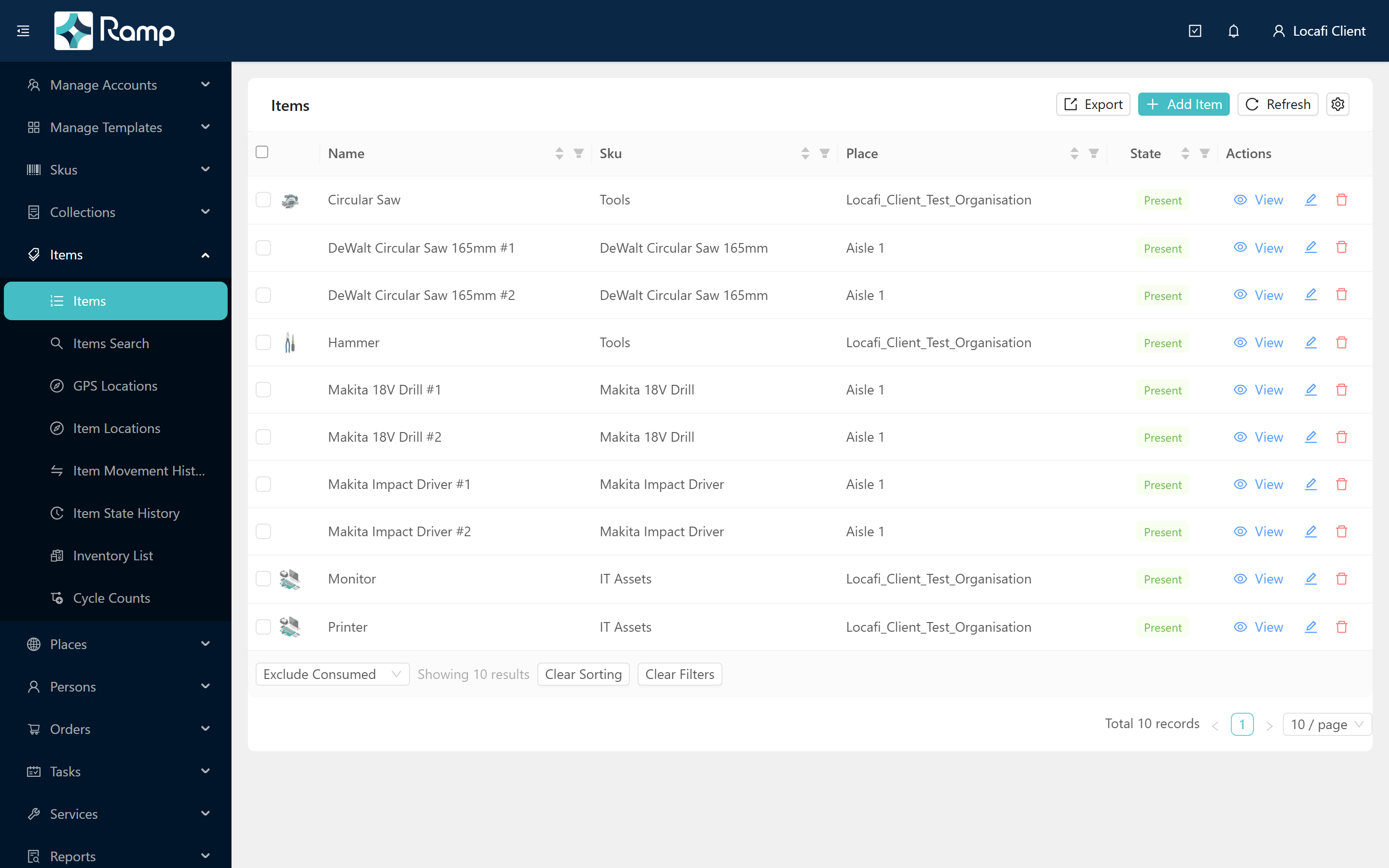
By default the list excludes Consumed items. The dropdown in the table footer lets you switch between the two views:

The Item State History page tracks every state change for a given item over time, with timestamp and actor. This feature is on the product roadmap.
State transition overview
Simplified — the full transition matrix is in the API documentation.
Rules operators feel
- Items on active orders cannot be deleted. An item in Allocated, Reserved, Dispatched, or OnLoan state is controlled by an order — deletion is blocked until the order is completed or cancelled.
- Stocktakes count the free pool. Stocktakes count Present, Moved, Missing, Cleared, and Restored items, plus order-terminal states (Received, Returned). In-progress order-owned states (Allocated, Reserved, Dispatched, OnLoan) and Consumed items are excluded from stocktake counts.
- Orders flip states automatically. Allocating an outbound order moves eligible items from Present → Allocated; dispatching moves them to Dispatched; completing receipt moves them to Received and eventually back to Present at the destination. See Orders at a glance for a full walkthrough.
- The only way out of Consumed is Restore. Use the Restore action on the item detail page to return a Consumed item to the free pool.
Related
- SKUs & the product catalogue — the product definitions items belong to
- Orders at a glance — how orders move items through states automatically
- Create items
For the item lifecycle and state-transition REST API reference, see the Loca.fi API documentation.