Templates & extended properties
Extended properties and templates are how Loca.fi lets you model your organisation's own data. Extended properties define the fields; templates group and assign them to entity types. Together they determine which fields appear on every item, place, person, and collection in your portal.
Extended properties
An extended property is a reusable custom field. It is defined once at the tenant level and can then be assigned to one or more templates. Every extended property has three fixed attributes:
- Name — the label users see on forms and reports.
- Template Type — which entity type the property belongs to: Item, Place, Person, Collection, Task, or Service.
- Data Type — controls what kind of value can be stored.
Data types
The following data types are available for any entity type:
| Data Type | What it stores |
|---|---|
| String | Free-text |
| Number | Whole number |
| Decimal | Number with decimal places |
| Bool | Yes / No toggle |
| Date | Calendar date |
| DateTime | Date and time |
| SelectList | One value chosen from a pre-defined list |
Item extended properties additionally support these traceability types:
- Batch Number
- Expiration Date
- Serial Number
- Lot Number
- Production Date
- Packaging Date
- Sell-By Date
Collection extended properties additionally support reference types — pickers that link a collection to another entity: Item, Place, Person, or Collection.
Immutability
An extended property's Data Type and Template Type cannot be changed after creation.
Plan your properties before you create them. If you chose the wrong data type, create a new property with the correct one — the existing property cannot be converted.
Templates
A template defines the shape of entities of a given type. It has:
- Name — the template's identifier (for example, "Power Tool" or "Warehouse Location").
- Template Type — the entity type it applies to: Item, Place, Person, or Collection.
- Assigned extended properties — an ordered list of the properties attached to this template. Each assignment also carries:
- Required — whether the field must be filled in before saving the entity.
- Group — an optional label used to cluster related fields together on entity forms.
Live migration
Changing which properties a template assigns immediately affects every existing entity built on that template.
For item templates this means every SKU and every item under those SKUs — on a large catalogue that propagation can take a while. Add, remove, or reorder template properties deliberately and outside peak operating hours.
What you see in the portal
On the template edit page
When you open a template for editing, the Extended Properties panel lists each assigned property as a row with Name, Is Required, and Group columns. You can drag rows to reorder them.
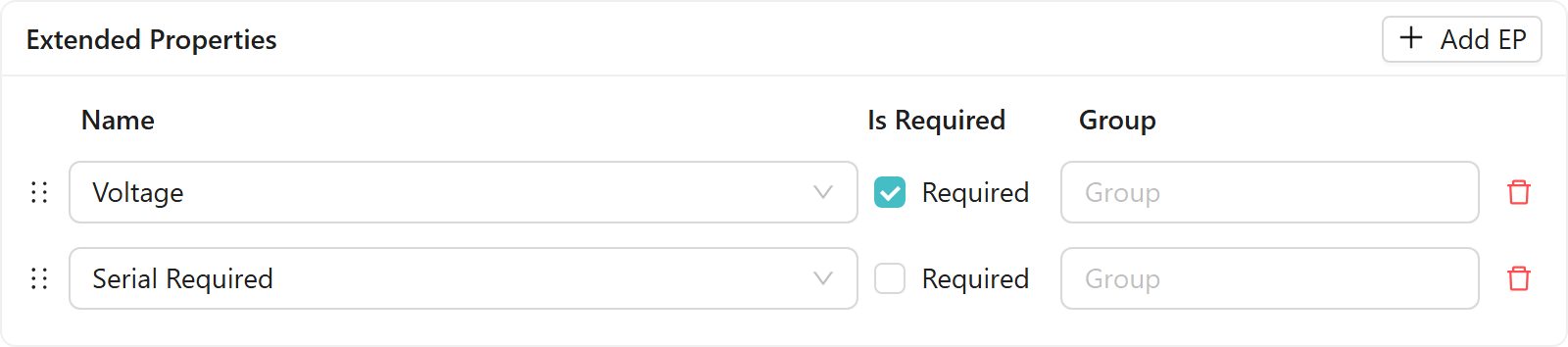
See Create a template with extended properties for a step-by-step guide to defining properties and building a template.
On entity forms
When you create or edit an entity, the form renders the fields defined by the selected template. For items, an Item Properties section appears after you choose a SKU — one row per assigned property. Required fields are shown with a locked toggle in the Is Required column.

Required fields must be filled in before you can save the entity. Optional fields can be left blank.
Related
- SKUs and the product catalogue — how item templates link to SKUs and shape what fields appear on each item
- Create a template with extended properties — step-by-step guide
For the extended properties and templates REST API reference, see the Loca.fi API documentation.